
Unreal Engine Core Fundamentals: The Architect’s Blueprint
Most developers treat Unreal Engine like a black box: drop Actors into a level, wire up some Blueprints, and pray the performance holds. If you want to build systems that scale (and survive multiplayer), you need a mental model of the engine’s architecture.
This isn’t a glossary. It’s a mental model you can use to make fast, correct decisions.
In this guide:
- We start with the core class hierarchy and composition (Components).
- Then we cover reflection/macros (UHT,
UPROPERTY,UFUNCTION) and how that becomes Blueprint nodes. - Finally, we touch the essentials: input, environment basics, and garbage collection.
Unreal Engine Basics
In Unreal Engine, code isn’t just organized; it’s inherited. Understanding the hierarchy is the difference between writing “spaghetti code” and architecting a professional game.
Hierarchy: Object Class -> Actor Class -> Pawn Class -> Character Class
If you prefer the real class names, the chain you’re usually reasoning about is:
UObject -> AActor -> APawn -> ACharacter
Each step down the chain adds capabilities. When you’re unsure what to inherit from, walk this hierarchy and choose the first class that gives you what you need (and nothing you don’t).
The Object Class
The UObject is the base class for almost everything. It handles the “magic” behind the scenes: reflection, garbage collection, and serialization. You can’t place a UObject in your level, but it underpins how the Editor exposes data and how the engine safely cleans up memory.
The Actor Class
Inheriting from UObject, the AActor is the first class that exists in the physical world. If it has a location, rotation, or scale, it’s an Actor. Actors are the building blocks of your world: they can be spawned, destroyed, and replicated across a network.
The Pawn Class
A APawn is an Actor that can be “possessed.” Think of it as a physical body waiting for a soul. That soul is the Controller (either a Human or an AI).
The Character Class
Specific to bipedal movement, the ACharacter is highly specialized. It comes pre-packaged with:
- CapsuleComponent: For precise collision.
- CharacterMovementComponent: A massive 20,000+ line C++ file that handles walking, swimming, falling, and networking prediction out of the box.
Components
Components are how you build modular gameplay. If a behavior should be reusable (movement, health, interact, inventory), it usually belongs in a Component rather than duplicated across Actors.
Inheritance gives you a foundation. Components let you compose behaviors without growing a giant class tree.
Rule of thumb:
UActorComponentfor pure logic/state.USceneComponentwhen it needs a transform (position/rotation/scale).UPrimitiveComponentwhen it renders or collides.
Custom Material
Now that your objects exist and behave correctly, you need them to read clearly in the world. The fastest “hello world” material setup:
Constant3Vector: RGB color vector (3+ click)- Plug it into
Base Colorto immediately tint your material
Material Inputs
Material inputs are optional channels you can drive with constants/textures:
- Metallic: scalar 0–1 (
1+ click) - Specular: scalar 0–1 (how reflective highlights appear)
- Roughness: scalar 0–1 (sharp vs blurry reflections)
- Emissive Color: glow/self-illumination
- Normal: surface detail direction (normal maps)
Use Material Instances to expose parameters (scalar/vector/texture) and create variations without duplicating the base shader.
Lights
Unreal Engine’s core light types:
- Point Light: radial light from a point (expensive if many are movable)
- Spot Light: cone-shaped light (inner/outer cone control falloff)
- Directional Light: sun/moon (global direction)
- Sky Light: captures ambient lighting from the skybox/cubemap
Lights Properties
Common properties that affect look and performance:
- Intensity: brightness (unit depends on project settings)
- Light Color: RGB color tint
- Attenuation Radius: how far the light reaches (larger = more expensive)
- Cast Shadows: turning off shadows improves performance
- Light Mobility:
- Static: baked, cannot change at runtime
- Stationary: can change color/intensity, cannot move
- Movable: fully dynamic, most expensive
To tweak these values in the Editor and call functions from Blueprints, you need Unreal’s reflection system. That’s what UHT and the macros are for.
Engine Macros: The Bridge Between Worlds
The Unreal Header Tool (UHT) is the most misunderstood part of the engine. It uses macros to translate your C++ into something the Editor can understand.
Unreal Header Tool (UHT)
UHT scans your header files for reflection macros (UCLASS, USTRUCT, UENUM, UPROPERTY, UFUNCTION) and generates glue code so the Editor can:
- expose values/functions to Blueprints
- serialize data
- participate in garbage collection
UPROPERTY
This macro tells the engine: “Track this variable.”
VisibleAnywhere: You can see it, but you can’t touch it.EditAnywhere: Your designers can tweak this value in real-time.BlueprintReadWrite: Allows your Blueprints to manipulate this variable, creating a seamless C++/Visual scripting hybrid.
UFUNCTION
Exposes C++ functions to the Blueprint graph and is the gateway to Networking (RPCs).
C++ to Blueprint Node
Understanding how C++ functions appear in Blueprints is vital for team collaboration. The specifier you choose changes how the node looks, whether it has execution pins, and what guarantees it makes.
BlueprintCallable
The method can be executed in Blueprints and has an execution pin.
UFUNCTION(BlueprintCallable)
void MyFunction();
Blueprint pure
The method has no execution pin and promises not to modify the state of the object.
UFUNCTION(BlueprintPure)
float GetStats() const;
BlueprintImplementableEvent
The method is defined in C++ but implemented in Blueprints. No C++ body is required.
UFUNCTION(BlueprintImplementableEvent)
void OnQuestCompleted(AActor* RewardActor);
BlueprintNativeEvent
Can be implemented in both C++ and Blueprints. The C++ implementation must have an _Implementation suffix.
// .h
UFUNCTION(BlueprintNativeEvent)
void CalculateDamage();

// .cpp
void AMyActor::CalculateDamage_Implementation() { /* logic */ }
Character Control
Basic bipedal movement in C++ involves binding axes to the CharacterMovementComponent.
void AMyCharacter::SetupPlayerInputComponent(UInputComponent* PlayerInputComponent) {
    Super::SetupPlayerInputComponent(PlayerInputComponent);
    PlayerInputComponent->BindAxis(TEXT("Forward"), this, &AMyCharacter::MoveForward);
    PlayerInputComponent->BindAxis(TEXT("Right"), this, &AMyCharacter::MoveRight);
}

void AMyCharacter::MoveForward(float AxisValue) {
    AddMovementInput(GetActorForwardVector(), AxisValue);
}

void AMyCharacter::MoveRight(float AxisValue) {
    AddMovementInput(GetActorRightVector(), AxisValue);
}
Environment Basics
Once your architecture is stable, environment work becomes dramatically easier because you’re not fighting your own foundations. Treat this as a quick checklist while building levels.
Collision
Standard methods for adding collision to static meshes:
- Engine primitives: Adding boxes or spheres within the Static Mesh Editor.
- Complex Collision: Using the mesh’s own geometry as collision (expensive).
- Custom Collision: Importing collision geometry from 3D software using the
UCX_prefix.
Materials and Textures
- Base Color: The primary color or texture.
- Normal Map: used to simulate surface detail without adding polygons.
- Roughness/Metallic: Controls how light interacts with the surface.
- Texture Compression: Always ensure masks use “Mask (no RGB)” and normal maps use “Normalmap” compression settings for optimal memory and visual fidelity.
Lighting Types
- Directional Light: Simulates sunlight.
- Point Light: Emits light in all directions from a single point.
- Spot Light: Emits light in a cone shape.
- Sky Light: Captures the distant parts of your level and applies it to the scene balance.
Garbage Collection on Unreal Engine
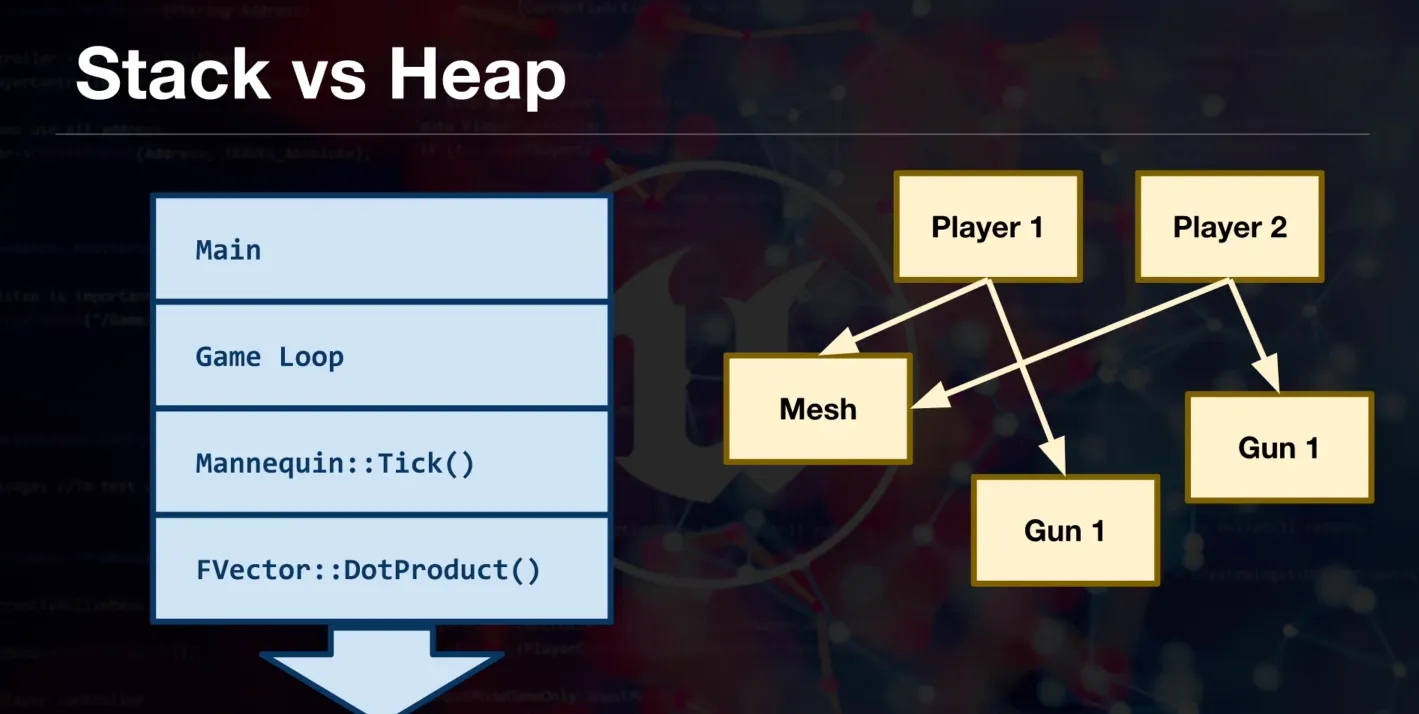
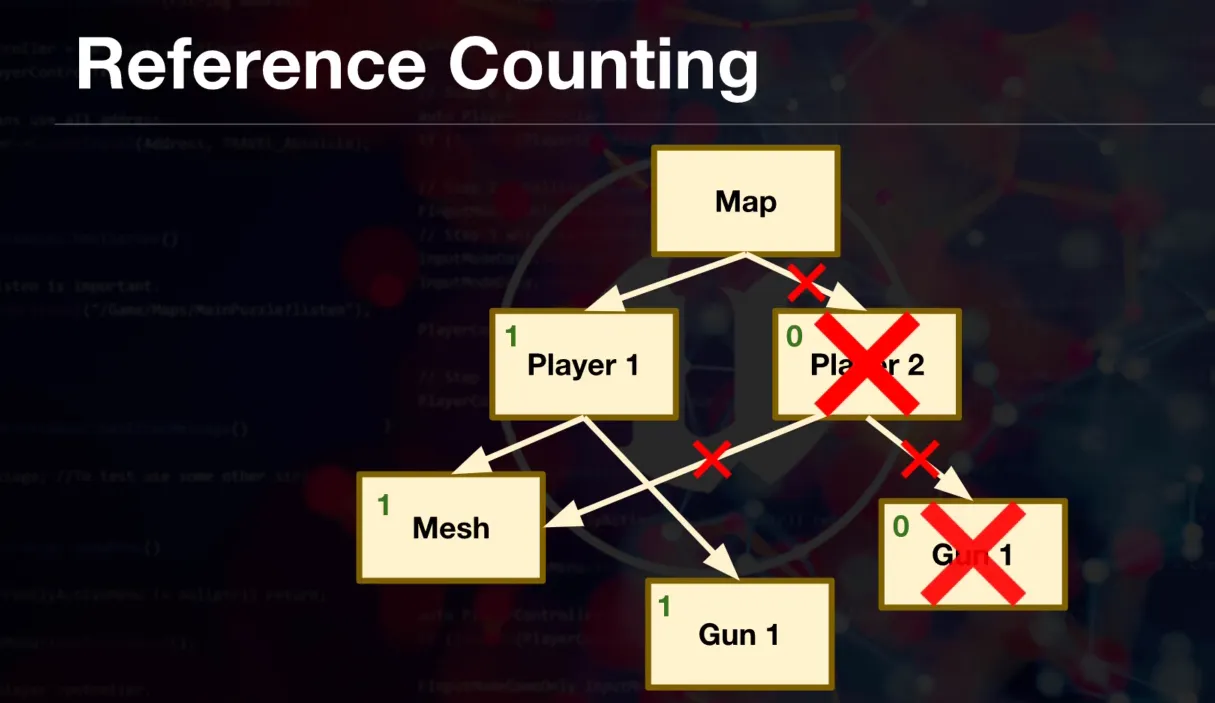
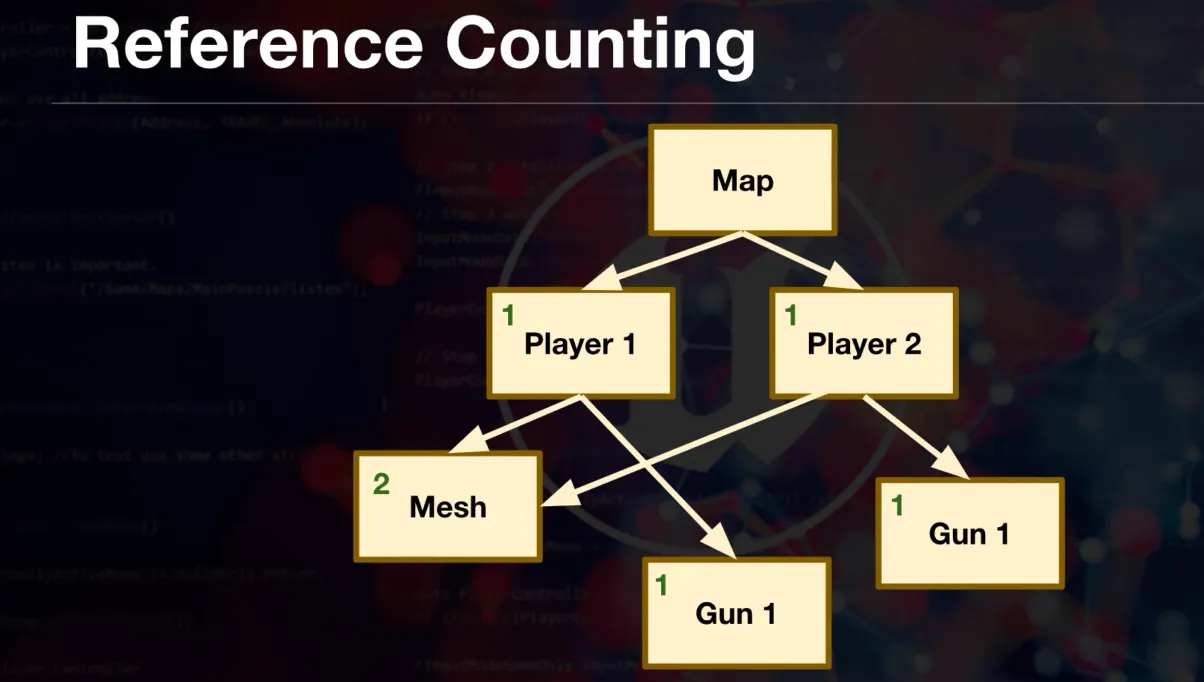
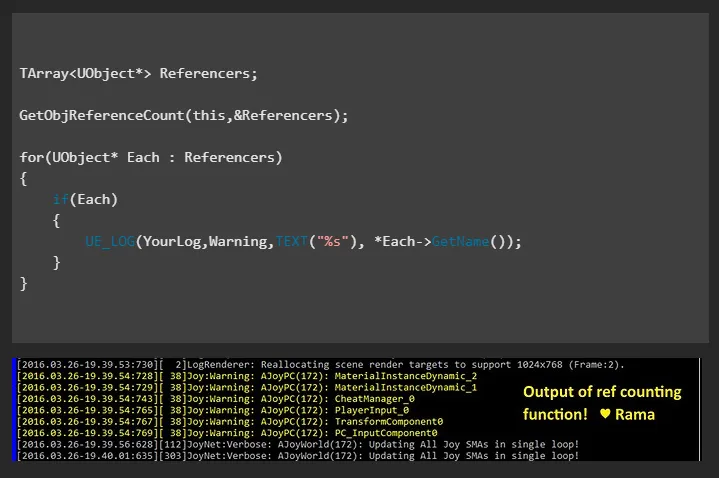
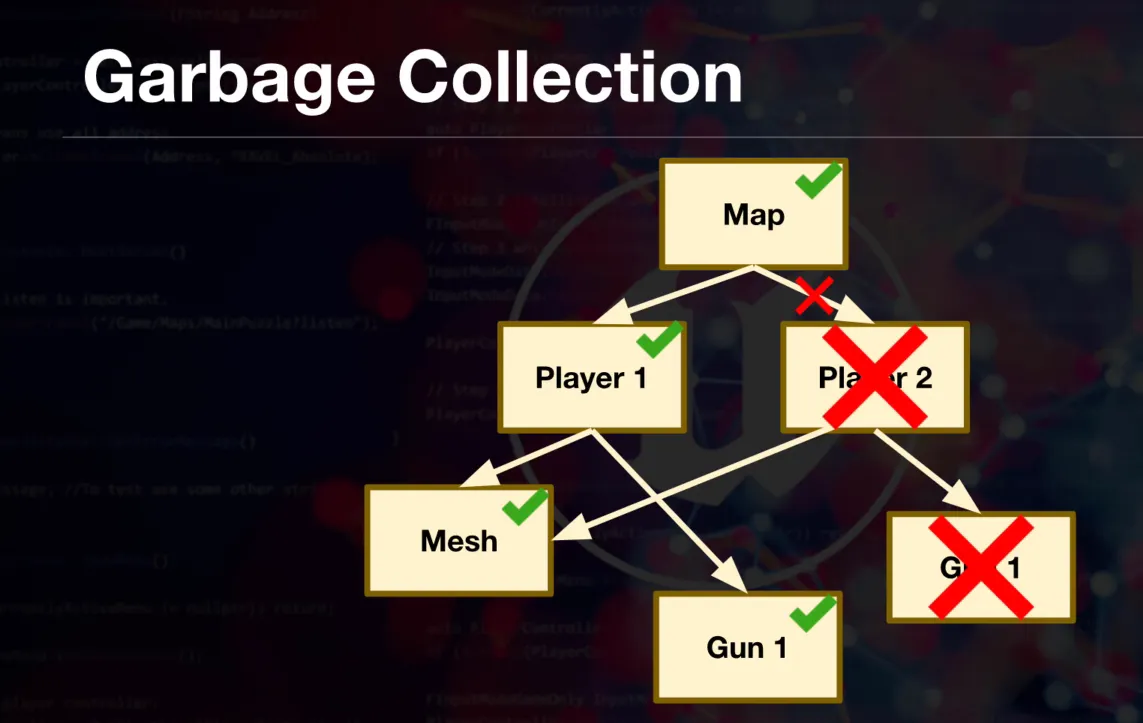
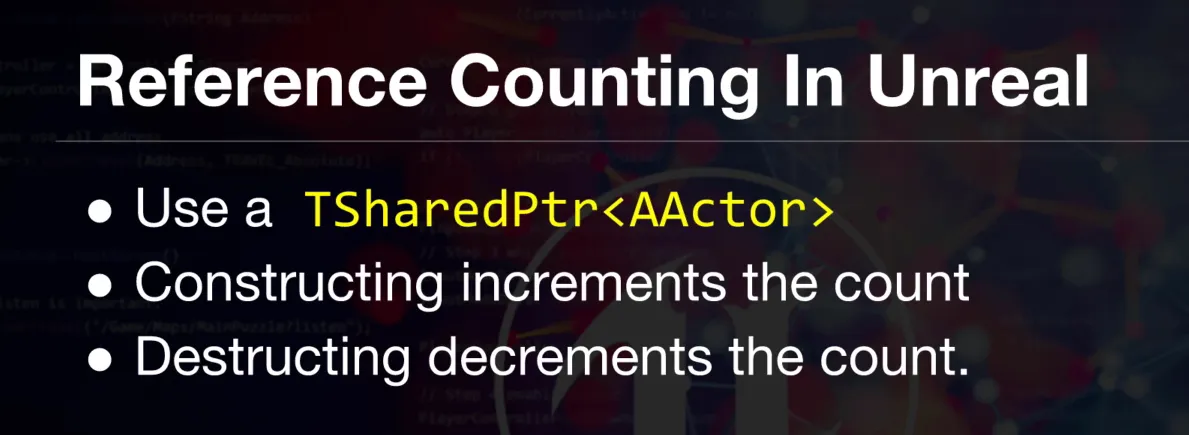
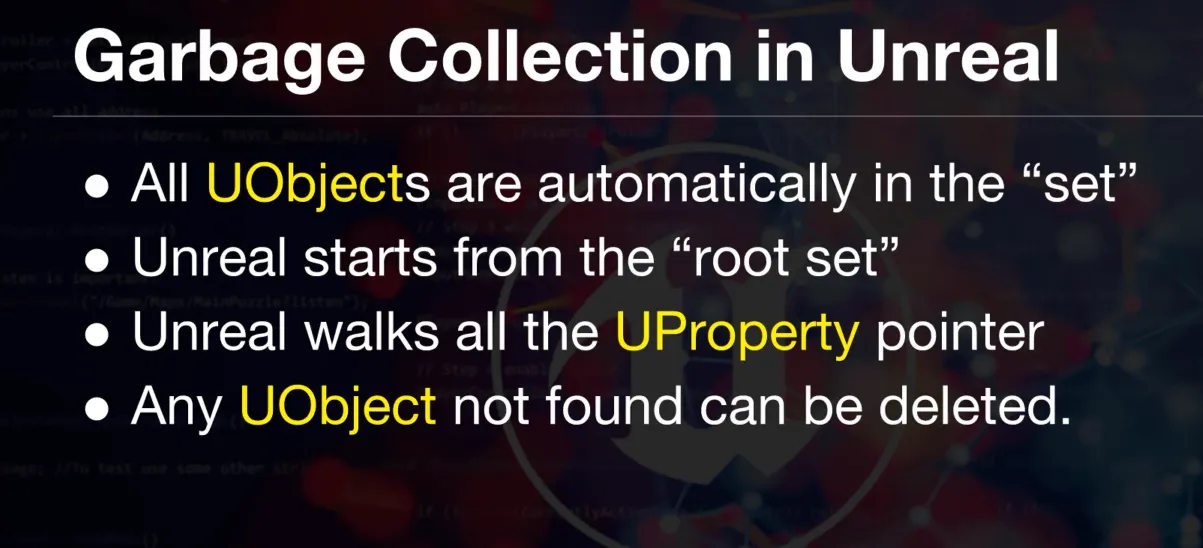
Unreal Engine uses a reflection-based garbage collection (GC) system. By using the UCLASS() macro and storing object pointers in UPROPERTY() variables, the engine automatically tracks references. When an object has no more references, the GC system will safely delete it from memory during the next collection cycle, preventing memory leaks without the need for manual new and delete calls.
GC diagrams and notes
Next Steps
- Continue into decoupled gameplay architecture (Interfaces, Delegates, Event Managers): Advanced C++ Patterns
- Standardize menus/settings/persistence patterns in Blueprints: Blueprint & UI Patterns
- Go deeper on save/data pipelines and integrations: Data & Integrated Systems